Photomator has quickly become one of the most popular AI-powered photo editing applications for Apple users who want professional-quality editing without complicated workflows. Whether you edit casual iPhone photos, social media content, portraits, or high-resolution RAW images, device compatibility plays a major role in overall performance and editing experience. Many users wonder which iPhones, iPads, and Macs support Photomator and whether older Apple devices can still run the app smoothly.
This guide explains everything you need to know about Devices Are Compatible with Photomator, including supported iPhone models, iPad compatibility, Mac requirements, iCloud syncing, RAW photo support, and optimization tips. It is designed for beginners, professional photographers, content creators, and Apple ecosystem users who want to understand how Photomator works across devices. By the end of this article, you will know exactly which hardware delivers the best editing experience and whether Photomator fits your workflow.
What Is Photomator?
Overview of Photomator
Photomator is an advanced AI-powered photo editing app designed specifically for Apple devices. Developed by Pixelmator Team, the app combines intelligent editing tools with a clean user interface optimized for iPhone, iPad, and Mac users.
Unlike many traditional editing apps that require extensive manual adjustments, Photomator uses machine learning to simplify professional editing tasks. The app supports RAW image editing, portrait enhancement, color grading, batch editing, and non-destructive workflows. It is particularly popular among creators who prefer fast editing with high-quality results.
Photomator integrates deeply with the Apple ecosystem, allowing users to edit photos across multiple devices using iCloud synchronization. Because it is built exclusively for Apple hardware, the app takes advantage of Apple Silicon chips and optimized macOS and iOS performance.
Key Features of Photomator
One reason Photomator stands out in the crowded photo editing market is its balance between simplicity and professional functionality. The AI Enhance feature automatically improves lighting, exposure, colors, and detail with a single tap, making editing easier for beginners.
Advanced users benefit from professional color correction tools, selective adjustments, curves, white balance controls, and batch editing capabilities. RAW image support allows photographers to preserve maximum image quality while editing high-resolution files from DSLR and mirrorless cameras.
The app also includes presets and filters optimized for portraits, landscapes, and social media content. Another major advantage is iCloud synchronization, which allows edits to remain updated across iPhone, iPad, and Mac devices automatically.
What Devices Are Compatible with Photomator?
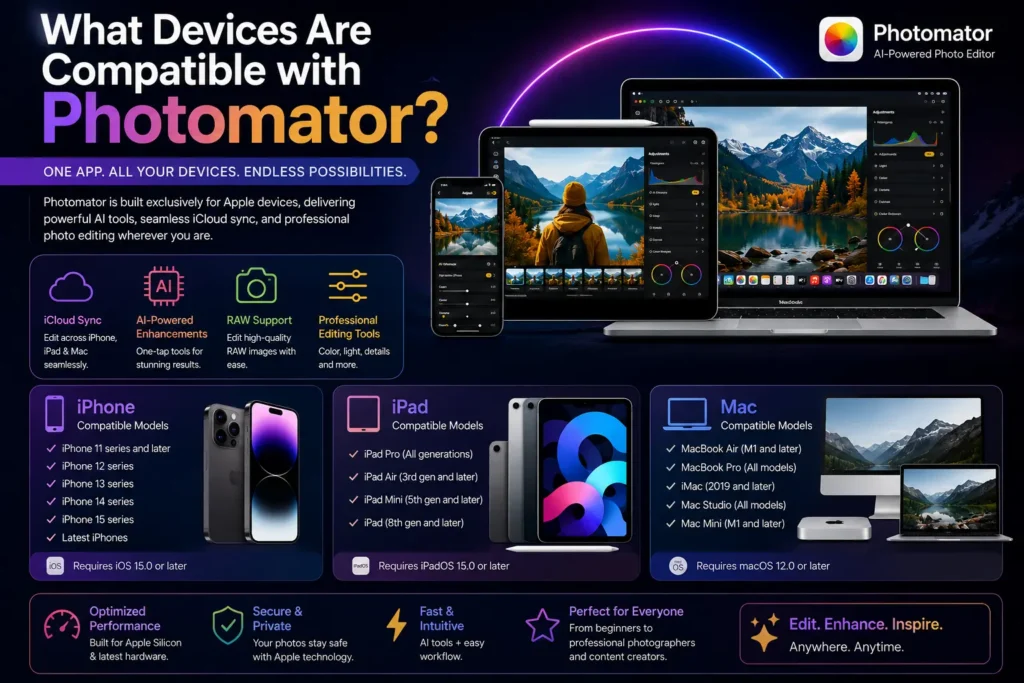
Compatible iPhone Models
Photomator supports modern iPhone models running updated versions of iOS. Since the app uses AI processing and GPU acceleration, newer devices provide significantly better editing performance.
Generally, Photomator works best on the following iPhone series:
- iPhone 11 series
- iPhone 12 series
- iPhone 13 series
- iPhone 14 series
- iPhone 15 series
- Latest iPhone models
Older devices may still run the application if they support the required iOS version, but performance can vary depending on available RAM and processor power.
For smooth editing workflows, devices equipped with Apple’s A14 Bionic chip or newer perform exceptionally well. Features such as RAW editing, AI Enhance, and large photo library management operate faster on newer iPhones because of improved neural processing and GPU efficiency.
Users who frequently edit portrait photos, ProRAW images, or social media content often prefer the iPhone 14 Pro or newer models because of their powerful camera systems and better memory management.
Compatible iPad Models
Photomator is also optimized for iPadOS, making it an excellent choice for creators who prefer larger screens and Apple Pencil workflows. The app supports multiple iPad models, including:
- iPad Pro
- iPad Air
- iPad Mini
- Standard iPad models
The iPad Pro offers the best editing experience due to its Liquid Retina display, M-series processors, and Apple Pencil integration. Professional photographers and digital artists often use the iPad Pro for detailed retouching and color adjustments.
Meanwhile, the iPad Air delivers excellent balance between performance and portability. Even compact devices like the iPad Mini can handle everyday photo editing tasks smoothly.
Apple Pencil support significantly improves precision during selective editing, masking, and retouching. Combined with multitouch gestures and high-resolution displays, iPads provide one of the best mobile editing experiences available today.
Compatible Mac Devices
Photomator also runs on macOS, allowing users to work with larger displays and advanced editing workflows. Compatible Mac devices include:
- MacBook Air
- MacBook Pro
- iMac
- Mac Studio
- Mac Mini
The app supports both Intel-based Macs and Apple Silicon devices, though Apple Silicon Macs provide dramatically better performance. M1, M2, and newer chips accelerate AI editing functions and RAW processing while improving battery efficiency.
MacBook Air models with M-series chips perform surprisingly well for everyday editing tasks, while MacBook Pro devices are ideal for professional photographers working with large RAW libraries and multitasking environments.
Mac Studio and high-end Mac Mini configurations are particularly suitable for advanced editing workflows involving large photo collections and multiple creative applications running simultaneously.
Minimum System Requirements for Photomator
iOS Requirements
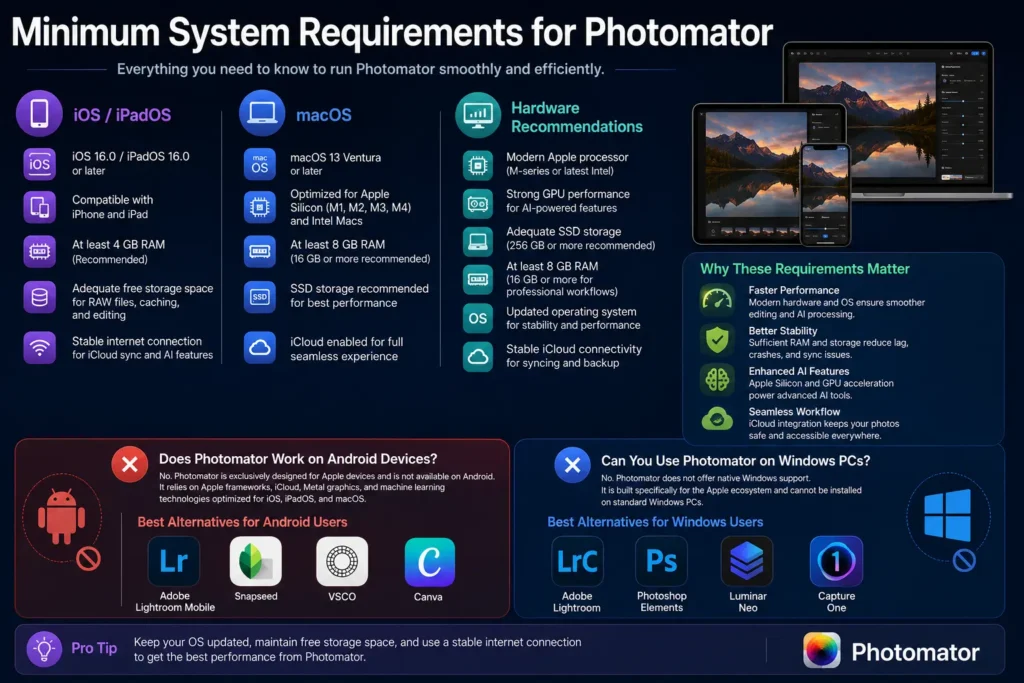
To install Photomator on iPhone or iPad, users need a compatible version of iOS or iPadOS. Apple regularly updates compatibility standards, so using the latest operating system ensures the best stability and performance.
Adequate free storage space is also important because RAW files and AI processing consume significant resources. Users should maintain enough available storage for caching, photo libraries, and temporary editing files.
Devices with higher RAM capacities deliver smoother performance, especially during multitasking and batch editing operations.
macOS Requirements
Photomator supports modern versions of macOS optimized for Apple hardware. Updated macOS versions improve security, performance, and compatibility with iCloud services.
While Intel Macs remain supported, Apple Silicon systems offer major advantages in rendering speed, AI enhancement, and power efficiency. Users editing high-resolution photos regularly benefit greatly from M-series processors.
For professional workloads involving large RAW files or layered editing projects, sufficient RAM and SSD storage improve responsiveness considerably.
Hardware Recommendations
Photomator relies heavily on GPU acceleration and machine learning processing. Devices with modern processors and graphics capabilities handle AI features more efficiently.
For the best experience, users should ideally have:
- A modern Apple processor
- Strong GPU performance
- Adequate SSD storage
- Updated operating systems
- Stable iCloud connectivity
Maintaining free storage space also helps prevent lag and synchronization problems.
Does Photomator Work on Android Devices?
Android Compatibility Explained
One of the most common questions users ask is whether Photomator supports Android smartphones or tablets. Currently, Photomator is exclusively designed for Apple devices and has no official Android version.
The application relies heavily on Apple frameworks, iCloud integration, Metal graphics acceleration, and machine learning technologies optimized specifically for iOS, iPadOS, and macOS. Because of this deep ecosystem integration, Android compatibility is not currently available.
Alternatives for Android Users
Android users looking for similar functionality can explore several high-quality alternatives. Popular options include:
- Adobe Lightroom Mobile
- Snapseed
- VSCO
- Canva
These apps provide RAW editing, filters, color correction, and mobile editing features compatible with Android devices.
Can You Use Photomator on Windows PCs?
Windows Compatibility
Photomator does not currently offer native Windows support. Since the application was developed specifically for Apple hardware and software environments, Windows users cannot install the app directly on standard PCs.
The absence of Windows compatibility may disappoint photographers who work across multiple operating systems. However, the Apple-exclusive design also allows Photomator to maintain highly optimized performance.
Best Alternatives for Windows
Windows users seeking professional photo editing software can consider several alternatives:
- Adobe Lightroom
- Photoshop Elements
- Luminar Neo
- Capture One
These applications provide advanced editing features, RAW support, and Windows compatibility.
Is Photomator Compatible with iCloud?
iCloud Sync Support
One of Photomator’s strongest advantages is seamless iCloud synchronization. Users can edit a photo on iPhone, continue working on iPad, and finalize adjustments on Mac without transferring files manually.
iCloud syncing keeps edits, metadata, and photo libraries updated across devices automatically. This creates a unified editing workflow that benefits photographers, content creators, and social media professionals.
Because edits are synchronized in real time, users can switch between devices effortlessly while maintaining project continuity.
How to Enable iCloud Sync in Photomator
Enabling iCloud sync is straightforward. Users simply need to activate iCloud Photos in Apple settings and ensure Photomator has permission to access photo libraries.
If synchronization issues occur, restarting devices, checking internet connectivity, updating operating systems, or re-enabling iCloud services often resolves the problem quickly.
Does Photomator Support RAW Photos on All Devices?
RAW Editing Compatibility
Photomator supports a wide variety of RAW camera formats, making it useful for professional photography workflows. However, editing performance depends heavily on device hardware.
Older iPhones and entry-level iPads may struggle with extremely large RAW files, while modern Apple Silicon devices process them smoothly. GPU acceleration and machine learning enhancements significantly improve RAW editing speed.
Photographers working with mirrorless cameras or DSLR systems benefit from Photomator’s non-destructive editing capabilities and AI-powered adjustments.
Best Devices for RAW Editing in Photomator
For serious RAW editing, some devices stand out more than others. M-series Macs offer exceptional rendering performance and multitasking efficiency. The iPad Pro also handles RAW workflows impressively well due to its processor power and high-quality display.
Among smartphones, the latest iPhone Pro models provide the best balance of camera integration, ProRAW support, and editing performance.
Read More About Photomator
Best Devices for Using Photomator Efficiently
Best iPhone for Photomator
The best iPhone for Photomator depends on editing needs and budget. Casual users can comfortably edit on iPhone 12 or newer models, while professional creators often prefer iPhone Pro devices.
Newer iPhones provide faster AI processing, smoother multitasking, and improved thermal efficiency during long editing sessions.
Best iPad for Professional Editing
For advanced editing workflows, the iPad Pro remains the strongest option. Its large display, Apple Pencil precision, and M-series processor create a highly efficient editing environment.
Color accuracy, portability, and multitasking support make it particularly attractive for photographers and social media creators working remotely.
Best Mac for Advanced Editing
Professional photographers managing large RAW libraries typically benefit most from MacBook Pro or Mac Studio systems.
These devices excel in rendering speed, export performance, multitasking, and high-resolution display support. Apple Silicon chips also improve battery life and thermal efficiency compared to older Intel systems.
Common Compatibility Issues in Photomator
App Not Installing
Installation problems usually occur when devices run outdated versions of iOS or macOS. Insufficient storage space can also prevent successful installation.
Updating the operating system and clearing storage often resolves the issue immediately.
Performance Lag
Older devices sometimes experience lag during AI enhancement or RAW editing tasks. Background applications consuming memory may worsen performance problems.
Closing unnecessary apps and restarting the device can improve responsiveness significantly.
Sync Problems
iCloud synchronization occasionally fails because of unstable internet connections or disabled iCloud settings.
Checking Apple ID settings, enabling iCloud Photos, and ensuring stable Wi-Fi connectivity usually solves synchronization issues.
Tips to Improve Photomator Performance on Older Devices
Free Up Storage Space
Keeping adequate free storage is essential for smooth editing. Removing unused apps, videos, and duplicate photos helps improve system performance.
Update iOS or macOS
Operating system updates often include performance improvements, bug fixes, and compatibility enhancements that benefit Photomator users.
Use Optimized Photo Libraries
Managing optimized photo libraries reduces device strain while improving editing responsiveness on older hardware.
Disable Background Apps
Closing resource-heavy applications frees RAM and processing power for smoother editing performance.
Photomator Compatibility Compared to Other Photo Editing Apps
| Feature | Photomator | Lightroom | Snapseed |
|---|---|---|---|
| iPhone Support | Yes | Yes | Yes |
| iPad Support | Yes | Yes | Limited |
| Mac Support | Yes | Yes | No |
| Windows Support | No | Yes | No |
| Android Support | No | Yes | Yes |
Photomator focuses heavily on Apple ecosystem optimization, while Lightroom offers broader cross-platform support. Snapseed remains useful for quick mobile editing but lacks desktop functionality.
Pros and Cons of Photomator Device Compatibility
Pros
Photomator integrates deeply with Apple devices, creating smooth workflows between iPhone, iPad, and Mac systems. iCloud synchronization simplifies cross-device editing, while Apple Silicon optimization improves speed and efficiency considerably.
The app also delivers excellent performance for AI-powered editing tasks and RAW photo workflows.
Cons
The biggest limitation is the lack of Android and Windows support. Users outside the Apple ecosystem cannot access the application natively.
This Apple-only approach may restrict collaborative workflows for users operating across multiple platforms.
Final Verdict
Photomator is one of the best photo editing applications available for Apple users who want powerful AI tools, RAW editing support, and seamless cross-device synchronization. The app works exceptionally well on modern iPhones, iPads, and Macs, especially devices powered by Apple Silicon chips. While the lack of Android and Windows support limits accessibility, its deep integration with the Apple ecosystem creates a highly optimized editing experience.
For beginners, newer iPhones and standard iPads provide more than enough power for everyday editing. Professional photographers and content creators, however, will benefit most from iPad Pro models and M-series Macs. If you already use Apple devices regularly, Photomator is absolutely worth considering for both casual and professional photo editing workflows.