
Introduction
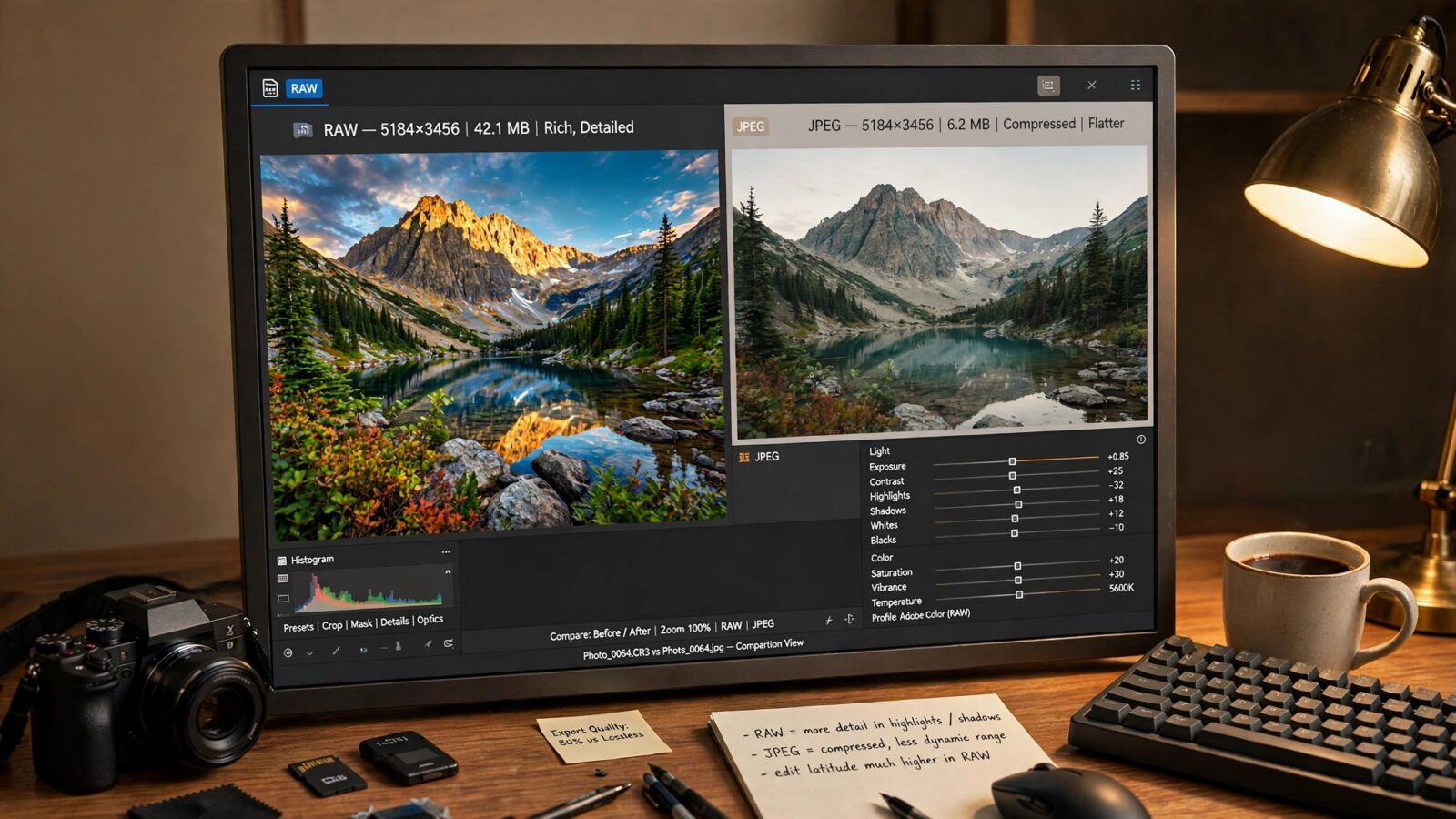
Every camera, from a dedicated mirrorless body to the iPhone in your pocket, has to decide what to do with the light it captures. That decision usually comes down to two file formats, and understanding raw vs jpeg is one of the simplest ways to get more from your photos. A RAW file keeps almost everything the sensor recorded, while a JPEG is a finished, compressed picture that the camera has already processed for you. Neither is automatically better; each suits different subjects and editing habits. This guide explains what each format actually is, where they differ in practice, and how to work with both in Photomator on Mac, iPhone and iPad.
What Is a RAW File?
A RAW file is best thought of as a digital negative. When you press the shutter, the camera saves the unprocessed data straight from the image sensor, with minimal compression and very little of the camera’s own interpretation applied. Details such as white balance, sharpening, contrast and noise reduction are stored as instructions rather than being permanently baked into the pixels.
Because so much information is preserved, RAW gives you remarkable freedom later. You can brighten a dark exposure, recover detail in bright skies, and shift colours substantially before the image quality begins to suffer. The trade-offs are size and effort. RAW files are much larger than JPEGs, they fill memory cards and storage quickly, and every file needs to be processed and exported before it can be shared like an ordinary picture. Apple devices can also capture Apple ProRAW, which blends RAW flexibility with computational photography convenience.
What Is a JPEG File?
A JPEG is the finished product. The camera takes the sensor data, applies its own processing — colour, contrast, sharpening and noise reduction based on the settings and scene — and then compresses the result into a small, universally compatible file. Once that compression happens, a large amount of the original data is discarded permanently. This is known as lossy compression.
In exchange, you get convenience: JPEGs are small, open everywhere and look complete the moment you take them. For casual snapshots and quick sharing, that is hard to beat. The limitation appears when you edit: heavy adjustments can produce banding in skies and blocked-up shadows, because so much data was thrown away. You can still edit a JPEG, but within much narrower limits.
RAW vs JPEG: The Key Differences Compared
The practical differences between the two formats show up in five main areas:
- Image data: RAW keeps the full sensor data; JPEG keeps only what survived in-camera processing and compression.
- Editing flexibility: RAW allows major exposure and white balance changes. JPEG tolerates gentle adjustments before quality drops.
- File size: RAW files are typically several times larger than JPEGs of the same scene.
- Workflow speed: JPEGs are ready to share immediately. RAW files need editing and exporting first.
- Quality ceiling: A carefully edited RAW file can reach a higher final quality, especially in difficult light, while a JPEG is limited by decisions the camera already made.
Neither list makes one format the winner. The right choice depends on how much editing you plan to do and how much the individual photo matters to you.
Editing Both Formats in Photomator
Photomator, from the Pixelmator Team, is built for exactly this kind of work on Mac, iPhone, iPad and Vision Pro. It edits both RAW files — including Apple ProRAW — and JPEGs non-destructively, so your original is never overwritten and any adjustment can be revisited or undone. Our step-by-step walkthrough of editing RAW photos in Photomator shows the full workflow from import to export.
With a RAW file, start with the big corrections: set white balance, recover highlights, lift shadows and only then fine-tune colour and contrast. You will be surprised how much detail a seemingly ruined exposure still holds. Difficult high-ISO shots benefit from the approach covered in our guide to denoise and super resolution in Photomator.
With a JPEG, work more gently. Make smaller exposure moves, watch smooth gradients for banding, and lean on selective adjustments rather than heavy global changes. The tools are the same — the RAW file simply gives them more to work with.
Which Format Should You Choose?
Choose RAW when the photo matters and the light is difficult: landscapes with bright skies and dark foregrounds, portraits you intend to retouch carefully, low-light scenes, and any image you may want to print large or revisit later. Choose JPEG when speed and volume matter more than maximum flexibility: everyday snapshots, events where you shoot hundreds of frames, and pictures you plan to share straight away with little or no editing.
Many photographers mix both, shooting RAW for deliberate work and JPEG for casual moments. The decision happens before you press the shutter, so set the format that matches the shoot.
Frequently Asked Questions
Is RAW always better quality than JPEG?
RAW has a higher quality ceiling because it keeps all the sensor data, but a well-exposed JPEG in good light can look excellent with no editing at all. RAW only pulls ahead when you actually use its extra editing flexibility.
Can Photomator edit RAW files from any camera?
Photomator works with a wide range of camera RAW formats as well as Apple ProRAW, and it handles JPEGs just as easily. Edits are non-destructive on Mac, iPhone and iPad, so the original file always stays untouched.
Why are RAW files so much bigger than JPEGs?
A RAW file stores the complete, unprocessed sensor data for every pixel, while a JPEG discards much of that data through lossy compression. Keeping everything is exactly what makes RAW more flexible — and much larger.
Can I convert a JPEG into a RAW file?
No. Once the camera has discarded data during JPEG compression, it cannot be recovered. You can edit a JPEG in Photomator, but converting it to a RAW container does not bring back the missing information.
Conclusion
The raw vs jpeg choice is really a choice about when decisions get made: in the camera, instantly, or by you, later, with far more control. JPEG wins on speed, size and convenience. RAW wins on flexibility, recovery and final quality. Photomator handles both comfortably on your Apple devices, so you can shoot each scene in the format it deserves and edit with confidence either way.